
INTRODUCTION
WooCommerce Easy Admin is the solution designed to optimize the management of your WooCommerce store.
The plugin offers an advanced notification system, inventory tracking and revenue analysis, all accessible directly from the WordPress admin bar and via automated reports.
The goal is to provide the right tools for eCommerce owners, managers and operators to keep track of key aspects of business growth.
MAIN FEATURES
1. Advanced Notification System
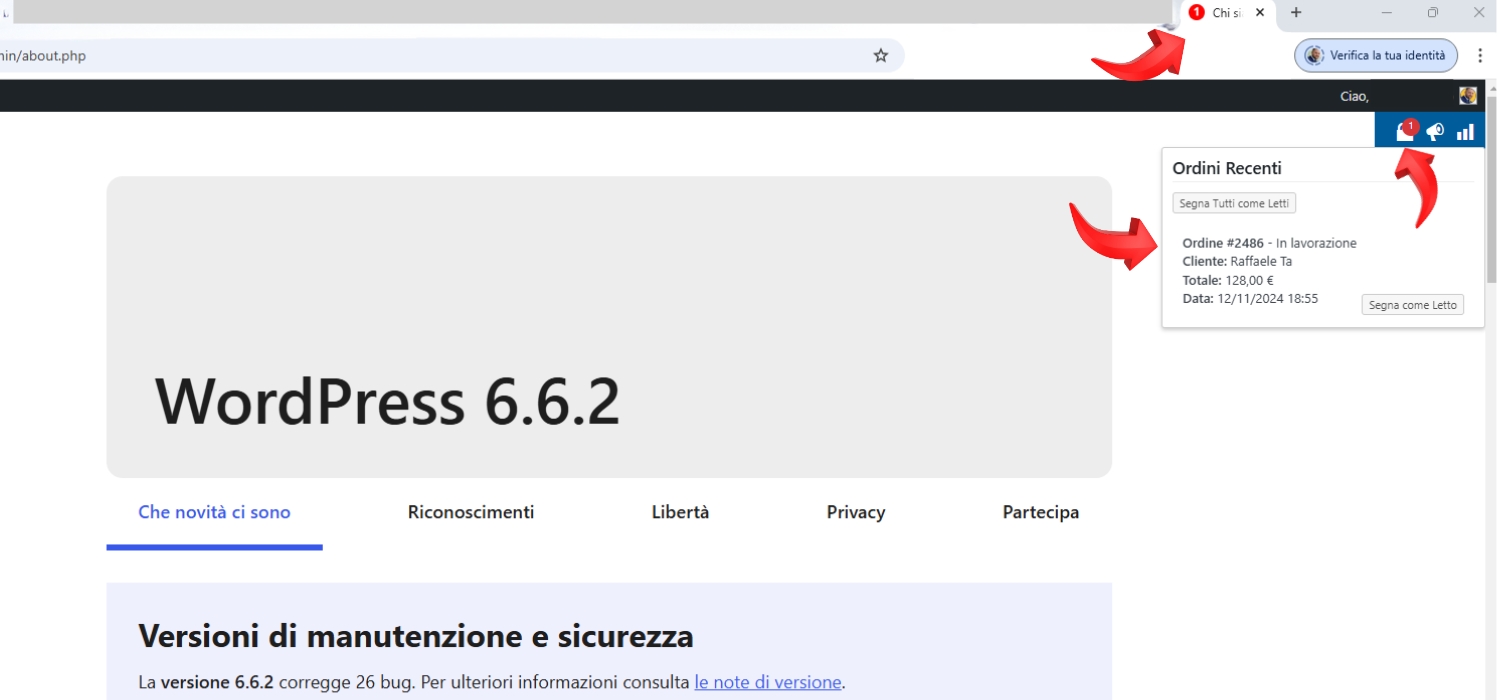
Order Notifications in Administration Bar
- Dedicated icon with unread order counter
- Order notifications also visible in browser tab
- Quick access to orders to be processed
- System for marking orders as “read”
View Notifications
- Detailed pop-up for each new order
- Counter updated in real time
- Ability to mark all orders as read
2. Warehouse Monitoring
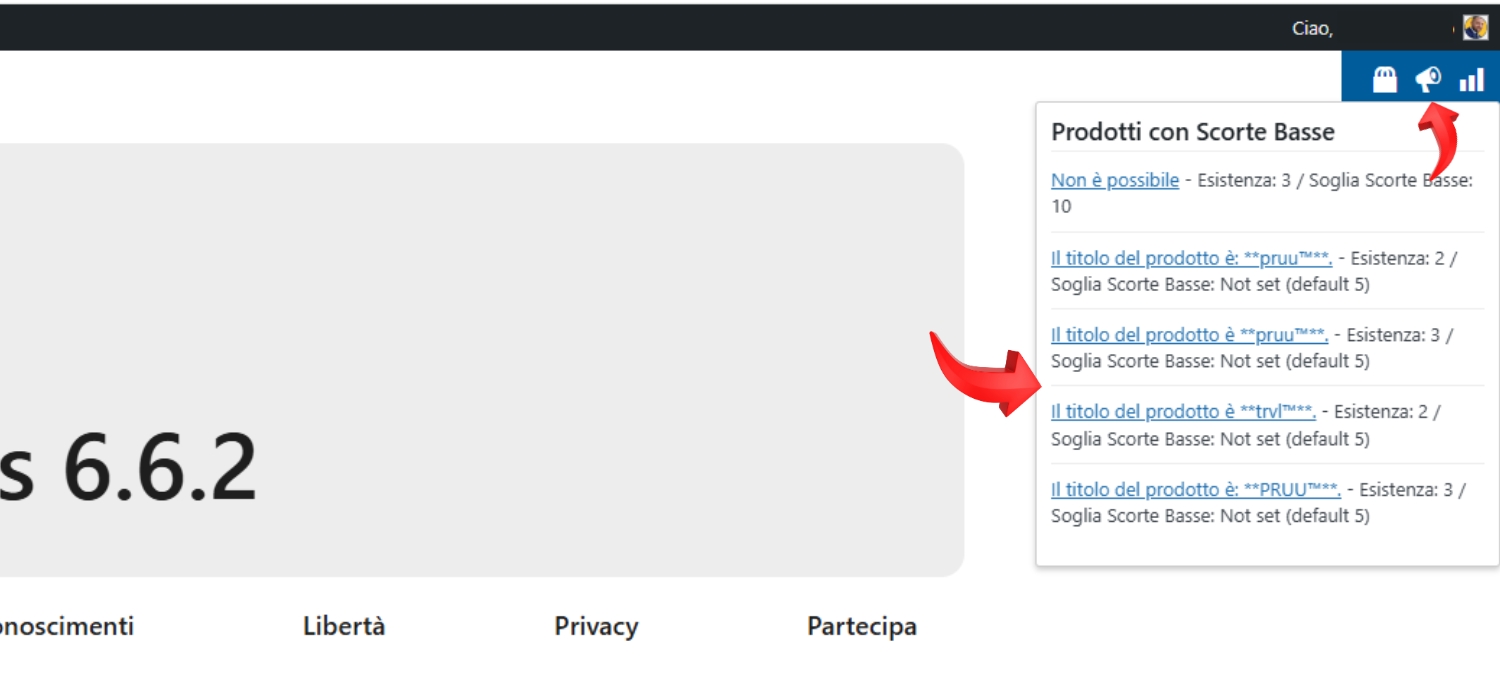
Low Stock Alert Products
- Dedicated indicator in the admin bar
- Customizable default low stock threshold
- Quick view of out of stock products
- Detailed reports via email
Product Stock Report Management
- Automated periodic reports for products and product variants
- Customization of sending frequency
- Multiple email recipients
- CSV format for easy processing
- Information contained in the CSV report: Product ID, Product Name, SKU, Quantity Available, Price, Quantity Sold, Average Sales Price.

3. Income and Sales Analysis
Income and Sales Dashboard
- Quick access to turnover data
- Customizable period comparisons
- Analysis of sales performance

Analysis Periods
- Last week
- Last month
- Last quarter
- Last year
- Custom periods
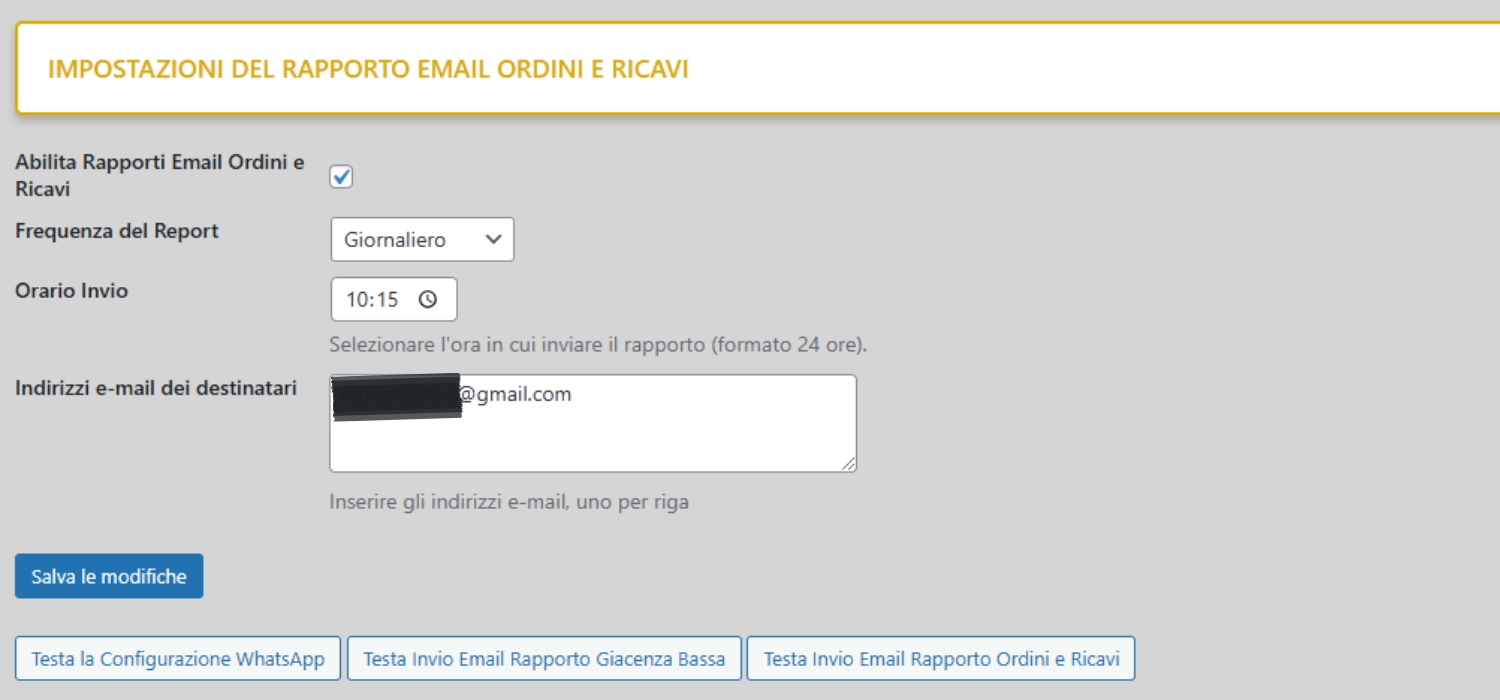
Income and Sales Report Management
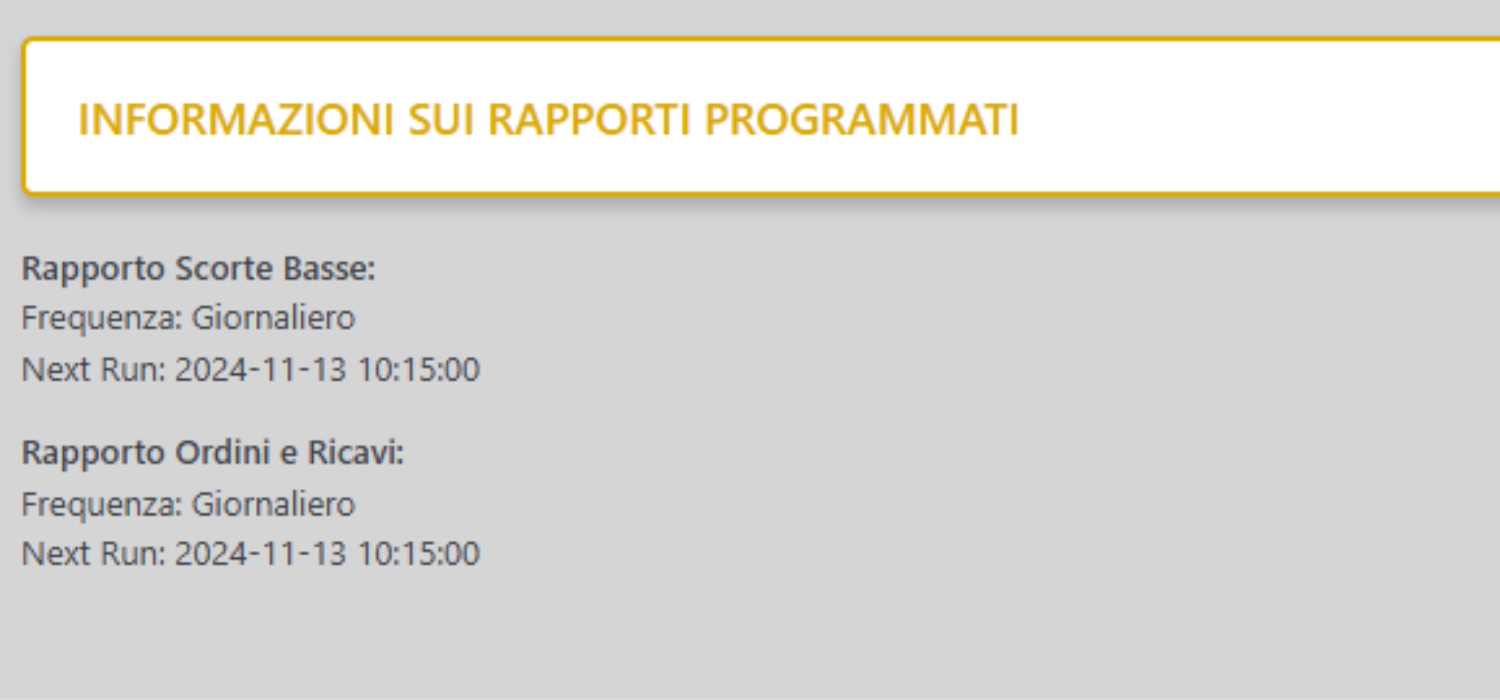
- Automated periodic reports
- Sending frequency customization
- Multiple email recipients
- CSV format for easy processing
- Information about individual orders in CSV report: Order ID, Date, Status, Total, Customer Email, Customer Name.
- Additional information in CSV report: Total Number of Orders, Total Revenue, Average Order Value.
4. WhatsApp integration
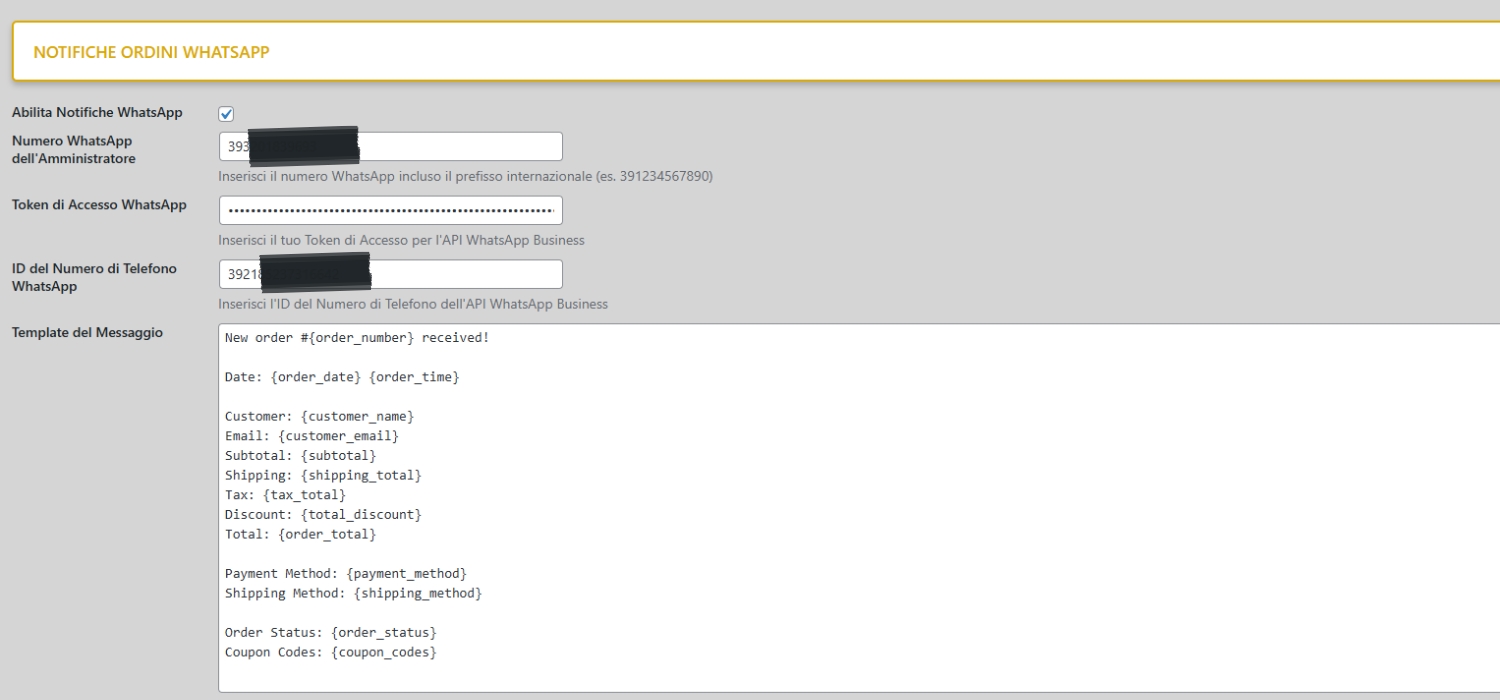
WhatsApp Order Notifications
- Automatic notifications for new orders
- Customizable message template
- Complete order information
- International numbers support
The plugin uses WhatsApp Business API v20.0 to send notifications.
Template Management
- Intuitive template editor
- Dynamic variables for order details
- Variable list: {order_number}, {order_date}, {order_time}, {customer_name}, {customer_email}, {subtotal}, {shipping_total}, {tax_total} {total_discount}, {order_total}, {payment_method}, {shipping_method}, {order_status}, {coupon_codes}
- Test notifications
CONFIGURATION
Installation and Activation
- Upload plugin
- Activate the license
- Verify that you have permissions to manage WooCommerce
- Configure basic preferences
- Enter a default value for the low stock banner (used only if no other WooCommerce settings are present)
WhatsApp Setup
Account Configuration
- Enter the WhatsApp number
- Set up the Access Token
- Set up the Phone Number ID
- Verify the connection
Message Template
- Customize the basic template
- Use variables in text
- Test message delivery
- Check formatting
DAILY USAGE
Order Management
Monitoring Notifications
- Check the unread order counter
- View order details
- Mark orders as read
- Manage multiple notifications
Quick Actions
- Click on icon in banner to see orders
- Mark individual orders as beds
- Mark all orders as read
- Direct access to orders
Warehouse Control
Stock Monitoring
- Check low stock indicator
- View products with critical existence
- Check quantities
- Set up automatic email alerts
Report and Analysis
- Generate custom reports
- Get automatic reports
- Analyze stock trends
Sales Analysis
Dashboard Revenue
- Quick access to data on periodic turnover
- Comparison between periods
- Performance analysis
Regular Reports
- Frequency configuration
- Single or multiple email recipients selection
- Automated sending
BEST PRACTICES
Workflow Optimization
- Monitor notifications regularly
- Configure appropriate stock thresholds
- Set up automatic periodic reports
- Customize WhatsApp templates
Efficient Management
- Keep your notification list clean
- Check low stock on a regular basis
- Analyze sales trends
- Compare periodic performance
FAQ
1) How do browser notifications work?
- Notifications appear in the admin bar
- Counter automatically updates
- Browser tab shows unread orders with a red notification badge
- Notifications persist until read
2) How to configure automatic low stock report?
- Set general default threshold
- Customize by individual product if needed
- Configure email recipients
- Define report sending frequency
3) How to customize the banner revenue?
- Select the period of analysis
- Choose the periods to be compared
- Set comparison parameters
4) How to customize the automatic revenue report?
- Select the period of analysis
- Choose the periods to be compared
- Set comparison parameters
SUPPORT
Assistance
- Online documentation
- Ticket support system
- Dedicated email
- Knowledge base
Updates
- Periodic releases
- Continuous improvements
- Performance optimizations
- New features
SECURITY AND PRIVACY
- Secure data management
- GDPR Compliance
- Protection of sensitive information